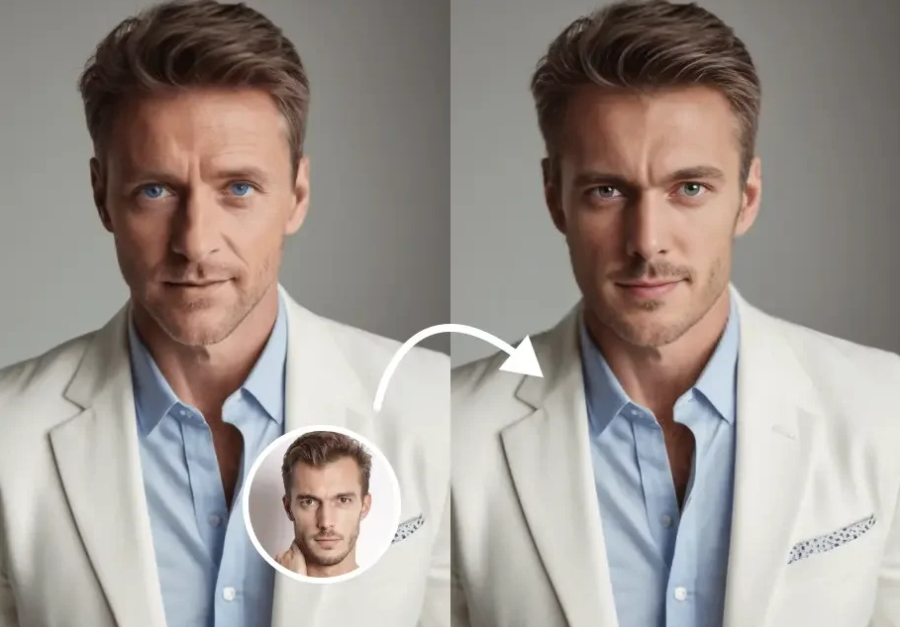
The way video content gets made has changed dramatically. Whether you are a solo creator remixing footage, a marketing team building ad campaigns without a studio, or a brand that needs multilingual content at scale, AI video tools have made things that used to take days happen in minutes.
Two capabilities sit at the center of this shift: face swapping in video and AI-powered UGC ad creation. Both were once the exclusive domain of professional post-production houses. Now they are browser-based, affordable, and accessible to anyone with a good idea.
This guide covers the best AI video face swap tools of 2026, tested across real footage, ad creation workflows, and ease of use. We break down what each tool does well, where it falls short, and exactly what you will pay.
At a Glance: Best AI Video Face Swap Tools of 2026
| Tool | Best For | Free Plan | Starting Price | Watermark-Free | API |
| Magic Hour | All-in-one face swap, UGC ads, full creative studio | Yes (400 credits) | $10/mo (annual) | Yes, on free plan | Yes |
| Reface | Quick consumer face swaps on mobile | Yes (limited) | ~$4.99/mo | Paid only | No |
| DeepFaceLab | Advanced offline face replacement | Open source | Free | Yes | No |
| Akool | Enterprise avatar and face swap | Trial only | $30/mo | Paid only | Yes |
| HeyGen | Avatar video and multilingual dubbing | Yes (3 videos/mo) | $29/mo | Paid only | Yes |
| Vidnoz | Beginner-friendly AI video creation | Yes (limited) | $22.49/mo | Paid only | Limited |
How We Choose These Tools
Every tool on this list was evaluated against the same set of criteria, not marketing copy. Here is what we looked at:
Output quality on real footage. Face swap on a still image is a different problem from face swap on moving video. We tested each tool on front-facing clips, moderate head movement, and varied lighting conditions to see how results hold up in realistic production situations.
Ease of use. A tool that requires 12 manual steps to produce one output is not practical for most creators or teams. We weighed how quickly someone could go from upload to finished output without a learning curve.
Free plan honesty. Most tools claim a free tier but restrict it so heavily it is functionally useless. We verified what the free plan actually lets you do, whether outputs are watermarked, and whether credit card details are required to try.
Pricing transparency. We cross-checked published pricing against official pricing pages and flagged tools where the advertised price requires annual billing or comes with significant gotchas.
Production reliability. For any tool used in a professional context, we considered stability, concurrent generation support, and how the tool handles high traffic or volume.
1. Magic Hour: Best Overall AI Video Face Swap and Creative Studio
Magic Hour is the strongest all-around platform for AI video creation in 2026. It brings together the best video face swap AI technology with a full suite of tools that includes lip sync, talking photos, text-to-video, image-to-video, animation, video upscaling, and an AI UGC video creator for ads under one roof.
What sets it apart is that it is built for real footage. Most tools either specialize in synthetic avatars or basic photo-level face swaps. Magic Hour applies face swap to actual recorded video, tracking and replacing the face frame by frame while preserving the natural look of the surrounding footage. The result is significantly more convincing on real content than tools built primarily for avatar workflows.
The UGC ad generator is one of the most practical features for marketing teams. You can generate creator-style ad content without organizing a shoot, and combine it with the face swap pipeline to drop a specific spokesperson or persona into that content. For brands that need to produce volume across multiple products or markets, this kind of one-click multi-step workflow is a meaningful time saver.
Other advantages worth knowing: credits never expire, there is no concurrency cap on generations (you can run multiple outputs in parallel), new features ship weekly, and the platform works on desktop and mobile without any download required. Support responses come at founder level, meaning you actually get a useful reply when something goes wrong.
Magic Hour is also trusted by production teams at major organizations including Meta, the NBA, and L’Oreal, which speaks to its reliability at scale and during high-traffic events like live activations.
What Magic Hour does well
Face swap on real video with accurate frame-by-frame tracking, combined face swap and lip sync in a single workflow, UGC ad generation without a camera, access to frontier AI models, click-to-create templates, parallel generation with no cap, and a free tier that is genuinely usable without a credit card.
Where it has limits
Face swap quality drops on extreme profile angles beyond roughly 70 to 80 degrees from the camera. It is optimized for realistic human faces rather than stylized or animated characters.
Pricing
Free plan includes 400 credits with no watermark and no credit card required. Creator plan is $15 per month or $10 per month billed annually, with 120,000 credits per year, 1024px resolution, and commercial use rights. Pro is $39 per month or $25 per month billed annually with 300,000 credits per year and 1472px resolution. Business is $99 per month or $66 per month billed annually with 840,000 credits per year, 4K resolution, and unlimited concurrent generations.
2. Reface: Best for Quick Consumer Face Swaps on Mobile
Reface is the most recognizable consumer app for face swapping and is best suited to casual, mobile-first use cases. It lets users drop their face into video clips, GIFs, and templates quickly, with a straightforward tap-and-go interface that requires no technical skill.
The quality on short, well-lit templates is decent at the consumer level. It is not built for production video or professional ad content, and it lacks the flexibility that creative teams need for custom footage. There is no API, no commercial licensing on lower tiers, and limited control over output quality.
Pricing: Free with limited swaps; paid plans start at approximately $4.99 per month depending on region.
3. DeepFaceLab: Best for Advanced Offline Face Replacement
DeepFaceLab is an open-source tool used by filmmakers and researchers who need granular control over the face replacement process. It runs locally on your own hardware, requires no subscription, and produces some of the highest-quality results available when configured correctly. The tradeoff is that the setup requires a capable GPU, technical comfort with command-line tools, and significant time investment for training models on specific faces.
It is not a browser-based or beginner-friendly option, but for creators who need full control and are willing to put in the work, the output ceiling is very high.
Pricing: Free and open source. Hardware costs apply.
4. Akool: Best for Enterprise Avatar and Face Swap Workflows
Akool focuses on enterprise use cases with a platform that covers face swap, talking avatars, and real-time video personalization. It is built for teams that need scalable, programmatic content creation and comes with API access, team management, and compliance-oriented features.
The output quality on its face swap tools is solid, and its real-time face swap capability is a standout feature for livestreaming or interactive video use cases. The pricing is on the higher end for smaller teams, and the free trial is evaluation-only.
Pricing: Plans start at approximately $30 per month. Enterprise pricing is custom and available on request.
5. HeyGen: Best for Multilingual Avatar Video at Scale
HeyGen is the leading platform for avatar-based video creation and is especially strong for multilingual content. It supports over 175 languages with lip sync matched to translated audio, which makes it valuable for global marketing and corporate communications teams.
It is worth noting that HeyGen is built for synthetic avatars rather than real footage face swap. If you need to apply a face swap to an existing recording of a real person, HeyGen is not the right fit. For avatar-driven video with high-quality dubbing across many languages, it leads the field.
Pricing: Free plan allows 3 watermarked videos per month. Creator plan is $29 per month ($24 per month annually). Business is $89 per month ($72 per month annually).
6. Vidnoz: Best Budget-Friendly Option for Beginners
Vidnoz is a beginner-oriented AI video platform with talking avatar creation, face swap, and video generation tools packaged in a simple interface. It is a reasonable entry point for individuals or small teams who want to experiment with AI video without a steep learning curve or high cost.
The output quality is functional for social content and internal communications but does not hold up as well for professional ad production or detailed footage work. The free plan is quite limited in terms of video length and monthly allowance.
Pricing: Free plan available with restrictions. Paid plans start at approximately $22.49 per month.
Frequently Asked Questions
What is the best AI video face swap tool in 2026?
For most creators and professional teams, Magic Hour is the best overall option. It delivers the strongest real-footage face swap quality, combines that with lip sync and UGC ad creation in a single workflow, and offers the most generous free tier of any comparable tool, with 400 credits and no watermark required from the start.
Can I use AI face swap tools commercially?
Most tools require a paid plan for commercial use. Magic Hour grants commercial use rights on all paid tiers and is one of the only platforms that offers watermark-free output even on its free plan, though commercial rights on the free tier are limited to personal use. Always check the terms of service for whichever tool you use.
Do I need a powerful computer to run AI face swap tools?
Browser-based tools like Magic Hour, HeyGen, and Akool run entirely in the cloud, so your local hardware does not matter. You only need a capable GPU for desktop tools like DeepFaceLab, which processes everything on your own machine.
How long does AI video face swap take?
Cloud-based tools typically process short clips in one to three minutes depending on length and resolution. Magic Hour supports parallel generation, so you can run multiple outputs at the same time without waiting in a queue.
Is AI face swap legal?
Applying face swap to content you own or have licensed is legal in most jurisdictions. Legal problems arise when face swap is used to put real people in situations they did not consent to, particularly synthetic media designed to mislead. Most platforms prohibit this in their terms of service, and laws covering non-consensual synthetic media are expanding across many regions. Always ensure you have appropriate rights and consent for any face you are swapping.
What makes Magic Hour different from other face swap tools?
Most face swap tools work on still images or use synthetic avatars. Magic Hour applies face swap to real recorded video, tracking and replacing faces frame by frame while maintaining the natural quality of the surrounding footage. It also combines face swap with lip sync, UGC ad generation, and a full suite of AI video tools in one platform, which reduces the number of tools teams need to manage.
Are there free AI video face swap tools?
Yes. Magic Hour offers 400 credits on its free plan with no credit card required and no watermark, which is the most generous free tier currently available. Reface and Vidnoz also have free plans with more restrictions. DeepFaceLab is entirely free and open source but requires technical setup and local hardware.
Conclusion
AI video face swap has moved well beyond the novelty stage. The tools available in 2026 can handle real footage, power ad campaigns, and produce content at a scale that would have required a full production team just a few years ago.
For most creators, marketers, and production teams, Magic Hour sits at the top of the list. The combination of best-in-class face swap on real video, integrated UGC ad creation, a genuinely usable free tier, and a full creative suite at a price that starts around $10 to $15 per month makes it difficult to beat for the range of work it covers.
The right tool ultimately depends on your specific workflow. If you need multilingual avatar video at scale, HeyGen is worth a look. If you need complete offline control over a complex production, DeepFaceLab has the ceiling for it. But if you want one platform that handles the full range of AI video creation without switching tools, Magic Hour is where to start.